
QuickSpots Antibody Array Analysis Documentation
Index » Auto Place TabSet Anchor Circle Positions
You can help Quick Spots to align your template by manually moving up to three circles to their correct locations. When you move the circles while in Set Anchors mode, Quick Spots will adjust the rest of the template based on the locations of the anchors you set.
To set an anchor, click the circle you wish to move with the right mouse button to select it, and then drag it to the correct position using the left mouse button and/or adjust its position using the arrow keys on your keyboard.
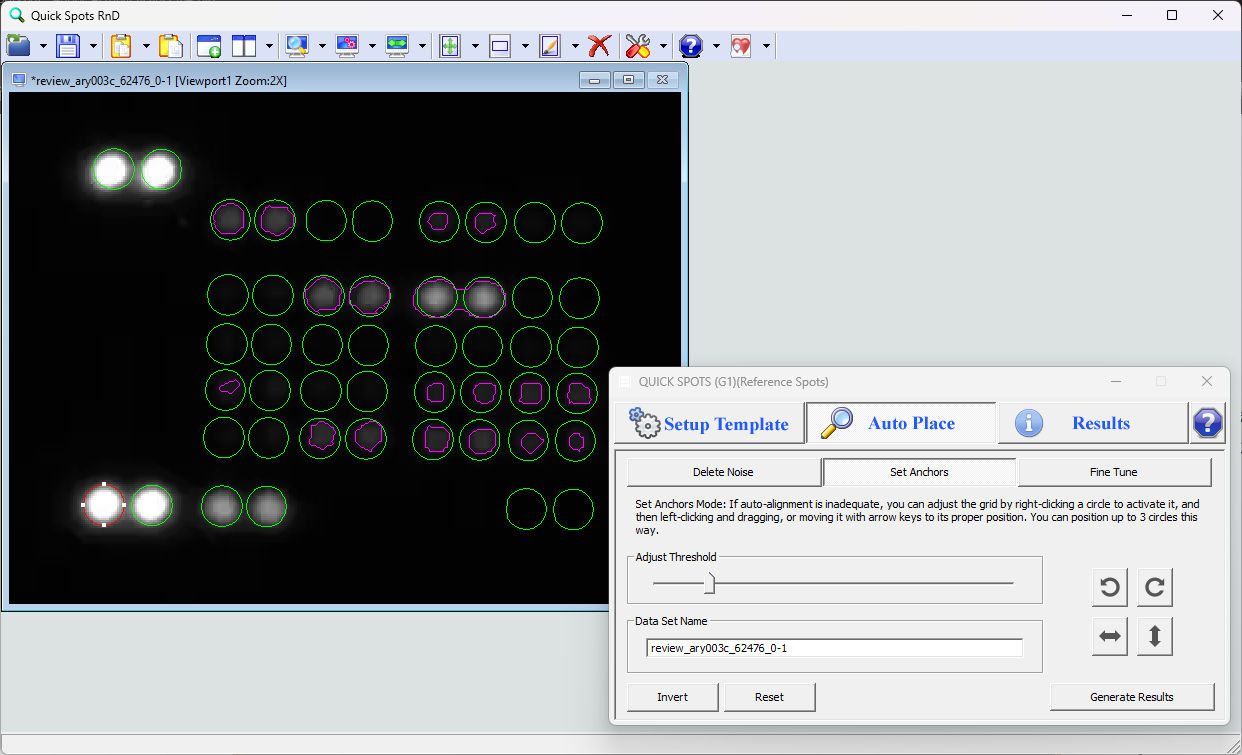
In this image, the lower-leftmost circle has been manually positioned over its corresponding spot, which has enabled Quick Spots to automatically align the rest of the template almost precisely over the other spots. Only the positive control spots in the upper left corner are slightly misaligned. Their positions can easily be corrected by either setting one of them as a second anchor, or by using Fine Tune mode, as described later.
« Adjust Threshold | Delete Noise »